Best Budget Wifi Thermostats
Choosing the right thermostat can feel overwhelming with so many smart options on the market, but you don’t need to spend a fortune to get reliable, energy-saving performance. Budget wifi thermostats now offer app control, scheduling, voice assistant compatibility, and energy tracking at prices that won’t strain your wallet. Below, we review eight affordable models to help you find the best fit for your home, followed by a detailed buying guide covering compatibility, features, and installation considerations.
1. Google Nest Thermostat

Connectivity: Wi-Fi 802.11b/g/n 2.4GHz and 802.11a/n 5GHz, Bluetooth Low Energy
C-wire: Not required for most systems
Control: Google Home app, remote temperature adjustment
Certification: ENERGY STAR certified
The Google Nest Thermostat brings reliable smart scheduling to budget-conscious buyers without demanding a C-wire in most installations. Its auto-away feature detects when you leave and adjusts temperatures automatically, preventing wasted energy on an empty house. The Savings Finder tool actively suggests schedule tweaks based on your habits, making it easy to trim utility bills over time.
Setup through the Google Home app is straightforward, and remote access lets any family member adjust settings from a phone or tablet. HVAC monitoring adds peace of mind by alerting you to system issues before they become costly repairs. It’s a strong all-rounder for typical homes.
Pros:
- Works without a C-wire in most homes
- Smart HVAC monitoring and alerts
- Easy multi-user remote control
Cons:
- Some systems still require a C-wire accessory
- No physical lock feature
2. vine Smart Thermostat
Wiring: C-wire required, compatible with 90% of 24V AC systems
Scheduling: 7-day x 8-period programmable
Voice control: Alexa and Google Home compatible
Certification: ENERGY STAR certified
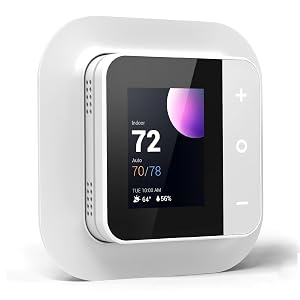
The vine Smart Thermostat targets budget shoppers who want granular scheduling without paying premium prices. Its 7-day, 8-period programming allows detailed customization for households with varying daily routines, while Auto Home/Away mode keeps temperatures comfortable only when needed. The companion app and Smart Life app both offer remote monitoring options.
Extra touches like filter change reminders and child lock add practical value uncommon at this price point. Installation is designed to be completed in under 20 minutes using step-by-step guides, making it approachable for first-time DIY installers. It compares favorably against pricier competitors for feature density.
Pros:
- Highly detailed 7-day, 8-period scheduling
- Child lock and filter reminders included
- Quick 20-minute installation
Cons:
- C-wire required for all installations
- Less established brand reputation
3. Heagstat WiFi Thermostat

Compatibility: Conventional 1 Heat/1 Cool systems only, C-wire required
Wifi: 2.4GHz only, 5GHz not supported
Scheduling: 7-day programmable
Accuracy: Temperature control within 2°F
The Heagstat WiFi Thermostat is built specifically for simpler, single-stage HVAC setups, making it one of the most affordable entries in this roundup. Its backlit LCD screen stays readable in dim hallways and basements, and the 7-day scheduling covers most household routines without unnecessary complexity. This focused design keeps costs low while still delivering solid remote app control.
Because it’s restricted to single-stage conventional systems, it won’t suit homes with heat pumps or multi-stage HVAC, so checking compatibility beforehand is essential. For the right setup, though, it delivers dependable performance and round-the-clock customer support for installation questions.
Pros:
- Very budget-friendly price point
- Backlit display for low-light readability
- 24/7 customer support for installation
Cons:
- Only supports single-stage conventional systems
- No 5GHz wifi support
4. Honeywell Home T5 Smart Thermostat

Wiring: C-wire required for most oil furnace systems
Scheduling: 7-day flexible or geofence-based
Certification: ENERGY STAR certified
Voice control: Alexa ready
The Honeywell Home T5 stands out for its dual scheduling approach, letting owners choose between fixed 7-day programming or geofencing that adjusts temperature based on smartphone location. Documented usage shows customers who lean on scheduling save meaningfully on heating and cooling bills, and the touchscreen interface makes daily adjustments simple.
Auto Home and Away mode complements the geofencing feature nicely, ensuring comfort when you’re present and savings when you’re not. Monthly energy reports through the app offer useful feedback for further optimizing usage. It’s a well-rounded pick for households wanting flexibility in how they automate comfort.
Pros:
- Choice of scheduling or geofencing
- Monthly energy reports and tips
- Touchscreen interface
Cons:
- C-wire needed for most oil furnace setups
- Geofencing depends on phone location accuracy
5. Sensi Smart Thermostat

C-wire: Not required in most applications
Installation: Built-in level, DIY app-guided setup
Energy savings: Up to 23% on HVAC costs
Certification: ENERGY STAR certified
Sensi appeals to buyers who want a smart thermostat that doesn’t look out of place among traditional models. It fits the same wall space as older thermostats, avoiding unsightly patchwork, while still delivering flexible scheduling and remote access through its app. The built-in level and guided installation steps make DIY setup genuinely approachable.
Beyond scheduling, Sensi tracks HVAC performance and sends maintenance reminders like filter replacements, helping extend equipment life. Its privacy policy, which states personal data won’t be sold to third parties, is a reassuring detail for privacy-conscious households. Overall it’s a dependable, no-fuss budget option.
Pros:
- No C-wire needed in most homes
- Fits standard thermostat wall space
- Strong privacy policy
Cons:
- Physical buttons feel less modern than touchscreens
- App interface less polished than competitors
6. Amazon Smart Thermostat

Wiring: C-wire required
Voice control: Deep Alexa and Ring integration
Scheduling: Home, away, and sleep modes
Estimated savings: Around $90 yearly per EPA estimates
The Amazon Smart Thermostat is built for households already invested in the Alexa ecosystem, offering comfort zones that sync with compatible Alexa devices for presence-based adjustments. Setup is guided entirely through the Alexa app, and customer service remains available if installation questions arise, keeping the DIY process low-stress.</p
Automatic scheduling covers home, away, and sleep routines, while Alexa+ features can take over temperature control dynamically. Rebate information is emailed after purchase, helping offset costs further. For Alexa households, this thermostat integrates more seamlessly than most competitors on this list.
Pros:
- Deep Alexa and Ring integration
- Affordable relative to name recognition
- Rebate assistance provided after purchase
Cons:
- C-wire required
- Less useful without Alexa devices
7. Honeywell Home X2S Smart Thermostat

Compatibility: Conventional and heat pump systems, C-wire required
Certification: Matter Certified, ENERGY STAR certified
Voice control: Alexa, Google Assistant, Apple HomeKit
Scheduling: 5-1-1, 5-2, 7-day, or non-programmable options
The Honeywell Home X2S distinguishes itself with Matter certification, meaning it integrates smoothly across multiple smart home platforms without vendor lock-in. It supports a wide range of scheduling formats, from simple 5-1-1 day splits to full 7-day customization, giving households flexibility to match their actual routines rather than a rigid template.
Additional features like humidity display, filter reminders, and an extended 32°F low-heat setpoint round out a genuinely feature-rich package for the price. The two-year warranty adds reassurance for long-term reliability. It’s a strong choice for anyone wanting cross-platform smart home compatibility.
Pros:
- Matter certified for broad compatibility
- Flexible scheduling formats
- Two-year warranty included
Cons:
- C-wire power adapter often needed
- Setup may require checking multiple compatibility factors
8. ecobee Smart Thermostat Essential

Compatibility: Works with 85% of 24VAC systems
C-wire: Not required, optional Power Extender Kit available
Voice control: Siri, Alexa, and Google Assistant
Savings: Up to 23% yearly on heating and cooling
The ecobee Smart Thermostat Essential pairs a color touchscreen with broad HVAC compatibility, appealing to households without a C-wire thanks to its optional Power Extender Kit. Free software upgrades keep the device current over time, and its compatibility checker tool helps buyers confirm fit before purchase, reducing return risk.
Automatic schedule adjustments based on presence help balance comfort and savings without manual intervention, while the app provides on-the-go energy tracking. Support for Apple HomeKit alongside Alexa and Google Assistant makes it one of the more voice-assistant-flexible options in this list.
Pros:
- Works without C-wire using PEK
- Broad voice assistant support including Siri
- Free ongoing software upgrades
Cons:
- PEK and trim kit sold separately
- Touchscreen may feel small compared to rivals
How to Choose the Best Affordable Wi-Fi Thermostat
Picking the right budget wifi thermostat is less about finding the cheapest option and more about matching the device to your home’s specific HVAC setup, your smart home ecosystem, and the features you’ll actually use day to day. Even among affordable models, small differences in wiring requirements, scheduling flexibility, and voice assistant support can significantly affect how satisfied you are after installation. This guide walks through the key factors to weigh before you buy.
Check Your HVAC System Compatibility First
Before comparing features or prices, confirm that a thermostat actually works with your heating and cooling system. Not all wifi thermostats support every HVAC configuration, and installing an incompatible unit can cause malfunctions or even damage equipment.
Conventional vs Heat Pump Systems
Conventional systems use a furnace or boiler paired with central air conditioning, while heat pump systems move heat rather than generate it, requiring different wiring terminals. Some budget thermostats, like single-stage models, only support basic conventional 1 heat/1 cool setups, while others handle multi-stage conventional systems or heat pumps with auxiliary heat.
The C-Wire Question
The common wire, or C-wire, supplies continuous 24V power to a thermostat, which most wifi-enabled models need to run their displays and wireless radios. Many budget thermostats require a C-wire outright, while others work without one in most homes or offer accessory kits, such as a power extender kit, to add C-wire functionality where none exists.
If you’re unsure whether your home has a C-wire, look behind your existing thermostat for a wire labeled “C” connected to its own terminal. If it’s missing, you’ll either need an electrician to run one, use a compatible power accessory, or choose a thermostat specifically designed to work without it.
| Wiring Situation | Recommended Approach |
|---|---|
| C-wire already present | Any thermostat on this list will work |
| No C-wire, simple system | Choose a model advertised as not requiring one |
| No C-wire, complex system | Look for a power extender kit accessory or hire an electrician |
Match Scheduling Features to Your Routine
Budget thermostats vary widely in how granular their scheduling options are. Some offer simple week/weekend splits, while others allow full 7-day programming with multiple periods per day.
Fixed Schedules vs Geofencing
A fixed 7-day schedule works well for households with predictable routines, letting you set specific temperatures for morning, day, evening, and night. Geofencing, on the other hand, uses your smartphone’s location to detect when you leave or approach home, automatically adjusting temperature without manual scheduling. This suits households with irregular hours but depends on consistent phone location permissions.
Auto Home and Away Modes
Most budget wifi thermostats include some form of automatic away detection, whether through geofencing, occupancy sensors, or simple schedule-based assumptions. This feature alone can meaningfully reduce energy waste, since a large share of HVAC costs come from conditioning empty homes.
Consider Voice Assistant and Smart Home Integration
If you already use Alexa, Google Assistant, or Apple HomeKit, choosing a thermostat that integrates with your existing ecosystem adds convenience through voice commands and automation routines.
- Alexa compatibility allows voice-based temperature changes and routines tied to other Alexa devices
- Google Assistant integration works similarly within Google Home routines and automations
- Apple HomeKit support lets you control the thermostat through the Home app and Siri
- Matter certification offers cross-platform compatibility without being locked into one ecosystem
Matter-certified thermostats are particularly future-proof, since they aim to work consistently across whichever smart home platform you choose now or switch to later.
Look for Energy-Saving Certifications and Reports
ENERGY STAR certification is a reliable indicator that a thermostat has been tested to deliver meaningful energy savings compared to manual models. Many certified budget thermostats advertise savings in the range of 20 to 23 percent on heating and cooling costs annually, though actual results depend on your climate, home insulation, and usage habits.
Energy Reports and Rebates
Several thermostats provide monthly or ongoing energy usage reports through their companion apps, helping you understand consumption patterns and identify further savings opportunities. It’s also worth checking with your local utility provider, since many offer rebates specifically for ENERGY STAR certified smart thermostats, which can offset a meaningful portion of the purchase price.
Evaluate Installation Difficulty
Most budget wifi thermostats are designed for DIY installation, typically completed in 20 to 45 minutes using in-app guides or printed instructions. Still, installation difficulty varies based on your existing wiring and system complexity.
- Simple systems with a C-wire already present are generally quick, straightforward installs
- Systems without a C-wire may require additional accessories or professional help
- Multi-stage or heat pump systems can involve more complex wiring terminals
- Built-in tools like bubble levels or app-guided wiring diagrams reduce installation errors
If you’re not comfortable working with electrical wiring, hiring a professional electrician or HVAC technician for a one-time installation fee is a reasonable investment, especially for more complex multi-stage systems.
Extra Features Worth Considering
Beyond core scheduling and compatibility, several extra features can improve daily convenience and long-term equipment health.
Maintenance Reminders
Filter change reminders and HVAC performance monitoring help extend the life of your heating and cooling equipment while catching potential issues before they become expensive repairs.
Display and Accessibility
Backlit touchscreens or LCD displays improve usability in dim rooms, basements, or hallways where thermostats are often installed. Larger displays with clear icons can also make daily adjustments easier for all household members.
Security Features
Child lock functionality prevents unwanted temperature changes by children or guests, which can be a valuable feature for households with young kids or shared living spaces.
Final Recommendation
For most budget-conscious buyers, the ideal choice balances confirmed HVAC compatibility, appropriate scheduling flexibility, and integration with whichever smart home ecosystem you already use. Always run your system through a manufacturer’s compatibility checker before purchasing, and factor in whether you’ll need a C-wire accessory to avoid installation surprises. With the right match, even an affordable wifi thermostat can meaningfully lower energy bills while improving daily comfort.