Best Thermostat Controlled By Phone of 2026
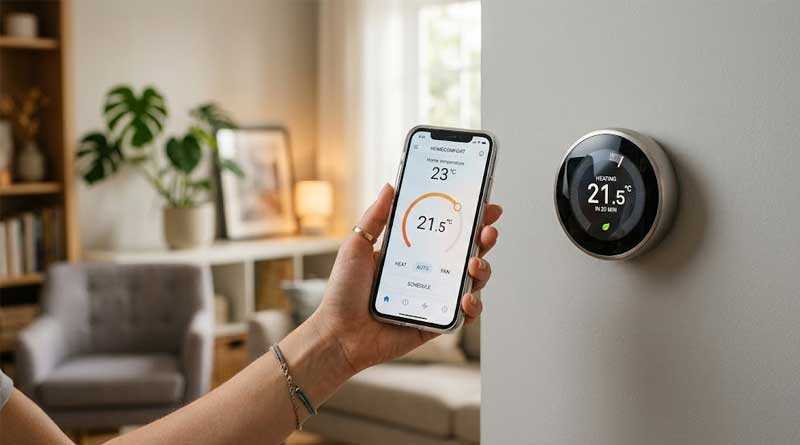
Upgrading to a phone-controlled thermostat is one of the easiest ways to increase home comfort and reduce monthly energy bills. Modern smart thermostats allow you to monitor and adjust your HVAC system remotely, set customized schedules, and leverage geofencing technology to save power while you are away. Whether you want a budget-friendly option, seamless integration with voice assistants, or advanced scheduling, choosing the right smart thermostat depends on your home’s wiring, compatibility, and preferences. Here are the top models currently available on the market.
1. Vine Smart Thermostat

- Display Size: 4.3-inch touchscreen with nightlight
- System Compatibility: 24V AC, 2H/2C conventional and heat pump systems
- Wiring Requirement: C-wire required
- Voice Control: Amazon Alexa and Google Assistant
The Vine Smart Thermostat features a bright 4.3-inch touchscreen and built-in nightlight function for easy viewing in any lighting condition. It supports flexible 7-day, 8-period programming alongside Auto Home and Away modes to optimize energy efficiency without sacrificing comfort.
With mobile app support and voice integration via Alexa and Google Home, managing temperatures remotely is simple. Additional security and utility features include data encryption, automatic Wi-Fi reconnecting, fan controls, and live weather forecasting on the display.
Pros:
- Large responsive touchscreen with nightlight
- Flexible 7-day, 8-period scheduling
- Comprehensive app and voice controls
Cons:
- Requires a C-wire for installation
- Slightly bulkier design on the wall
2. Sensi Lite Smart Thermostat
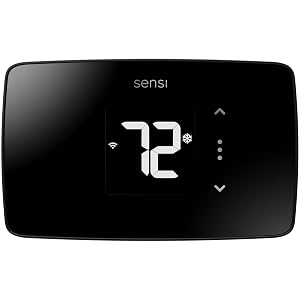
- Energy Efficiency: ENERGY STAR certified (saves ~23% on HVAC)
- Installation: Built-in bubble level for DIY mounting
- Wiring Requirement: C-wire optional for standard systems
- Privacy: No personal data selling or targeted ads
The Sensi Lite ST25 is an accessible smart thermostat designed for easy installation and privacy-conscious users. Featuring a built-in bubble level and simple app guidance, most homeowners can install it quickly without professional help.
It helps reduce annual HVAC energy consumption by around 23% through smart scheduling, geofencing, and remote app access. Sensi stands out by maintaining a strict privacy policy, guaranteeing your household data is never sold to third parties.
Pros:
- Works without C-wire on standard systems
- Strong privacy protection policy
- ENERGY STAR certified with geofencing
Cons:
- C-wire required for heat pumps
- Minimalist screen display design
3. Honeywell Home RTH9600WF Thermostat

- Screen Type: Customizable color touchscreen
- Ecosystems: Alexa, Google Assistant, Microsoft Cortana
- Wiring Requirement: C-wire required
- On-Screen Info: Indoor/outdoor temperature, humidity, weather
The Honeywell Home RTH9600WF offers a vibrant display that allows users to customize screen background colors to match their home decor. The unit provides live indoor and outdoor humidity readings along with local daily weather forecasts directly on the screen.
ENERGY STAR certified, this thermostat provides detailed usage reports and qualifies for local energy provider rebates. You can program schedules directly on the device or manage temperatures on the go through smart home integration and companion mobile apps.
Pros:
- Fully customizable screen color themes
- Displays indoor/outdoor humidity and forecasts
- Broad voice assistant compatibility
Cons:
- Mandatory C-wire power supply
- Does not support electric baseboard heat
4. Amazon Smart Thermostat

- Certification: ENERGY STAR certified
- Integration: Amazon Alexa and Ring integration
- Wiring Requirement: C-wire required
- Energy Savings: Average $90 annual savings
Designed to work seamlessly with Alexa and Ring platforms, the Amazon Smart Thermostat is an economical option for smart home enthusiasts. Guided installation via the Alexa app makes upgrading simple, while dynamic temperature rules keep your living space comfortable.
By leveraging presence detection and Alexa Advanced features, the system adjusts heating and cooling based on whether you are at home or away. ENERGY STAR certification helps users save money while qualifying for utility rebate programs.
Pros:
- Affordable entry point for smart home setup
- Automated presence detection with Alexa
- ENERGY STAR energy savings
Cons:
- Requires C-wire adapter if missing
- Best experience limited to Alexa users
5. ecobee Smart Thermostat Essential

- Ecosystems: Apple HomeKit, Alexa, Google Assistant, Siri
- System Compatibility: Works with 85% of HVAC systems
- Wiring Solution: Supports Power Extender Kit (PEK)
- Energy Savings: Up to 23% annually on heating/cooling
The ecobee Smart Thermostat Essential delivers robust energy management combined with broad cross-platform ecosystem compatibility. It integrates smoothly with Apple HomeKit, Google Assistant, and Alexa, making it a versatile center for multi-platform households.
It automatically tunes heating and cooling cycles around your personal schedule to save up to 23% annually on utility expenses. Free software updates ensure your device receives ongoing optimizations and performance enhancements over time.
Pros:
- Supports Apple HomeKit and Siri voice commands
- Includes option for C-wire Power Extender Kit
- Consistent automated updates
Cons:
- Power Extender Kit sold separately
- Lacks premium internal room sensors out of box
6. Google Nest Thermostat

- Connectivity: Wi-Fi and Bluetooth Low Energy
- Control App: Google Home app for iOS and Android
- Wiring Requirement: Works without C-wire on most systems
- HVAC Monitoring: System health alerts and maintenance reminders
The Google Nest Thermostat blends sleek industrial design with intelligent energy monitoring. It uses built-in sensors and phone location signals to automatically lower temperatures when you leave the house, reducing energy waste effortlessly.
Through the Savings Finder feature, the Google Home app analyzes your temperature habits and suggests small scheduling tweaks to lower energy costs. It also monitors HVAC health, alerting you if unusual patterns indicate potential equipment issues.
Pros:
- Works without C-wire on basic HVAC setups
- Proactive HVAC system monitoring and alerts
- Sleek modern aesthetics and interface
Cons:
- Requires C-wire for zone-controlled or heat pump systems
- No manual rotation ring like Nest Learning models
7. Sensi Smart Thermostat ST55

- Design: Traditional thermostat footprint with buttons
- Wiring Requirement: No C-wire required in most applications
- App Support: Step-by-step installation with built-in level
- Energy Certification: ENERGY STAR certified
The Sensi ST55 combines traditional physical buttons and a familiar wall profile with advanced Wi-Fi functionality. It fits into the same footprint as classic wall units, avoiding the need to patch or paint drywall after installation.
Equipped with smart maintenance monitoring, it tracks system usage and delivers filter replacement reminders directly to your smartphone. With flexible scheduling and broad compatibility, it simplifies energy conservation without complex touchscreens.
Pros:
- Familiar traditional design with physical buttons
- No C-wire needed for standard applications
- Covers existing screw holes from old units
Cons:
- Basic monochrome display screen
- Lacks advanced touch controls
Buyer’s Guide: How to Choose a Phone-Controlled Smart Thermostat
Upgrading your home heating and cooling control to a Wi-Fi thermostat managed by a smartphone app offers tremendous convenience and clear financial savings. However, selecting the right device requires understanding technical compatibility, smart ecosystem integration, power wiring, and energy-management features. Below is a comprehensive guide to selecting the best phone-controlled thermostat for your home.
Understanding System Compatibility
Before purchasing any smart thermostat, confirming compatibility with your existing Heating, Ventilation, and Air Conditioning (HVAC) system is crucial. Not all thermostats support every climate control setup.
Common HVAC Types
- Conventional Systems: Standard forced-air gas, oil, or electric furnaces paired with central air conditioning units. Most basic smart thermostats work seamlessly with these setups.
- Heat Pumps: Multi-stage systems that handle both heating and cooling. These require thermostats capable of managing reversing valves and auxiliary emergency heating coils.
- Boilers and Radiant Heating: Systems relying on hot water radiators or in-floor heating pipes. They often use heat-only configurations.
- High-Voltage Baseboard Heaters: Electric baseboard heaters running on 120V or 240V lines are incompatible with low-voltage (24V) smart thermostats unless a specialized line-voltage relay is used.
- Conventional Forced Air (Gas/Electric)
- Low Voltage (24V AC)
- Supported by virtually all smart thermostats.
- Heat Pump (with Aux/Emerg Heat)
- Low Voltage (24V AC)
- Requires multi-stage (2H/2C) smart thermostat models.
- Boiler / Hydronic Radiator
- Low Voltage (24V AC)
- Requires heat-only compatible thermostat profiles.
- Electric Baseboard Heaters
- Line Voltage (120V / 240V)
- Incompatible with standard 24V smart thermostats.
The Common Wire (C-Wire) Requirement
Smart thermostats need continuous electrical power to maintain Wi-Fi connections, power color touchscreens, and run background software updates. Traditional thermostats relied on batteries or brief power bursts from heating cycles, whereas smart devices generally prefer a dedicated 24V power return wire known as a C-wire (Common wire).
What to Do If You Lack a C-Wire
- Choose a C-Wire Free Model: Thermostats like the Sensi ST55 or Sensi Lite are designed to operate without a C-wire on basic conventional heating and cooling setups.
- Install a Power Extender Kit (PEK): Brands like ecobee offer or sell PEK modules that combine signals over your existing thermostat wiring to supply steady power without pulling new cables.
- Use a 24V Wall Adapter: For DIY installations near electrical outlets, plug-in C-wire transformers can route steady power directly to the thermostat backplate.
- Run New Cable: Hiring an electrician or HVAC technician to pull a fresh 5-conductor wire cable from the furnace control board to your wall location.
Smart Home Ecosystem Integration
For maximum convenience, your smart thermostat should integrate into your existing smart home network. This enables voice control, home automation routines, and unified management through a single mobile platform.
Primary Ecosystem Platforms
- Amazon Alexa: Offers broad device support. Allows voice commands like “Alexa, set the temperature to 72 degrees” and supports complex routines based on room occupancy or time of day.
- Google Assistant & Google Home: Ideal for Android users and Nest owners. Provides intuitive voice controls and geofencing triggers.
- Apple HomeKit: Essential for iOS users seeking integration within the Apple Home app or Siri voice control. Note that models like the ecobee Essential support HomeKit directly, whereas Amazon and Google thermostats may require third-party bridges or Matter protocol support.
Key Mobile App and Energy-Saving Features
The primary benefit of a phone-controlled thermostat lies within its software capabilities. Evaluating the features provided by the companion app ensures long-term satisfaction.
Essential Mobile Software Capabilities
- Remote Temperature Adjustments: Change target temperatures, switch modes (Heat, Cool, Auto, Off), and adjust fan settings from anywhere with internet connectivity.
- Geofencing: Uses your smartphone’s GPS location to detect when family members leave or approach home, adjusting temperatures automatically to save energy while away and restore comfort upon arrival.
- 7-Day Custom Scheduling: Set tailored daily heating and cooling schedules matching your work, weekend, and sleep routines.
- Usage Reports and Energy Insights: Monitor monthly HVAC runtime data to track consumption trends and discover potential efficiency upgrades.
- HVAC System Alerts: Receive notifications if your home temperature drops or rises beyond safety thresholds, or if maintenance items like air filter changes are required.
Design, Display, and Installation
Thermostats are mounted in central living areas, so aesthetics and ease of use matter.
Physical Interface Options
- Full-Color Touchscreens: Displays like those on the Honeywell RTH9600WF or Vine Smart Thermostat provide detailed information like local forecasts, humidity levels, and custom background colors.
- Minimalist or Traditional Controls: Devices like the Sensi ST55 offer physical buttons that feel familiar to all household members while retaining full phone-controlled capabilities behind the scenes.
DIY Installation Considerations
Most modern Wi-Fi thermostats can be installed in 30 minutes or less. Look for models that include built-in bubble levels, clear terminal wire labeling stickers, and step-by-step video tutorials within their installation apps to ensure a smooth, hassle-free setup.