Best Thermostats for Home Assistant of 2026
Integrating a smart thermostat into Home Assistant unlocks unprecedented automation, granular energy tracking, and local climate control. While standard apps limit your options, linking your heating and cooling system to Home Assistant allows for advanced routines based on presence detection, room-level sensors, and dynamic power pricing. Selecting the right model depends on your existing wiring, local protocol preferences, and desired aesthetic. From offline-first Matter devices to feature-packed units with native cloud integrations, finding a compatible thermostat elevates your smart home ecosystem, ensuring seamless comfort while maximizing seasonal energy savings across all connected zones.
1. Sensi Smart Thermostat ST55

- Connectivity: Wi-Fi
- C-Wire Required: No (most applications)
- Energy Saver: ENERGY STAR Certified (~23% savings)
- Ecosystem Support: Home Assistant, Alexa, HomeKit
The Sensi ST55 combines a traditional wall-thermostat look with modern smart features. Designed for quick DIY setup, it fits existing footprints without requiring wall patching. Its robust privacy policy ensures user data is not sold to third-party advertisers.
For Home Assistant users, the official Sensi integration delivers reliable control over HVAC modes, target temperatures, and scheduling. Built-in maintenance alerts notify you of required filter replacements, helping you preserve system efficiency and prevent unexpected hardware failures over time.
Pros:
- Does not require a C-wire in most heating setups
- Familiar button layout ideal for traditional homes
- Strong privacy protection policy
Cons:
- Basic monochrome display design
- Lacks native local control protocols like Matter
2. Aqara Smart Thermostat W200

- Protocol: Matter 1.4 Over Wi-Fi
- Display: 4-Inch Touchscreen
- Presence Sensor: Built-in mmWave Radar
- Compatibility: 85% of HVAC Systems
The Aqara W200 is a cutting-edge thermostat featuring native Matter 1.4 support for direct local integration with Home Assistant. Its 4-inch color touchscreen acts as a command center, displaying climate metrics alongside compatible door cameras and visitor alerts.
Equipped with built-in mmWave radar, it provides true presence detection to trigger automation rules instantly. Local control guarantees fast response times and continued functionality without cloud dependencies, making it an excellent centerpiece for privacy-focused smart homes.
Pros:
- Local Matter control prevents reliance on cloud servers
- Integrated mmWave presence detection sensor
- Acts as a smart front-door display
Cons:
- Requires a C-wire adapter for some setups
- Advanced features require Matter 1.4 support
3. Honeywell Home RTH9600WF Thermostat

- Display Type: Customizable Color Touchscreen
- Wiring: C-Wire Required
- Power Ratings: 24V Systems
- Energy Saver: ENERGY STAR Certified
Featuring a full-color customizable touchscreen, the Honeywell Home RTH9600WF displays live outdoor weather forecasts alongside indoor humidity and temperature readings. Users can adjust screen color themes to match their wall paint or interior room design.
The device pairs easily with Home Assistant through cloud integrations, providing full control over temperature points and system modes. Built-in energy tracking provides personalized usage insights, helping homeowners qualify for utility rebates while keeping operational power costs low throughout the year.
Pros:
- Customizable high-definition color screen
- Displays indoor and outdoor humidity trends
- Wide platform integration compatibility
Cons:
- Requires a dedicated C-wire for installation
- Cloud-dependent API integration
4. Vine Smart WiFi Thermostat
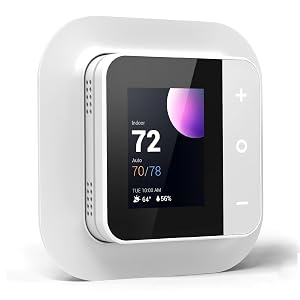
- Scheduling: 7-Day x 8-Period Programmable
- System Support: 24V AC Systems (up to 2H/2C)
- Wiring: C-Wire Required
- Certification: ENERGY STAR Certified
The Vine Smart Thermostat offers budget-friendly smart heating and cooling management. Supporting 7-day custom schedules with up to eight time periods per day, it ensures consistent indoor climate comfort while significantly cutting down on idle HVAC energy consumption.
Through Tuya or Smart Life integrations, Home Assistant can retrieve live sensor readings and trigger automated state shifts based on house occupancy. Helpful features include child safety locks, filter change alerts, and automated clock synchronization over Wi-Fi networks.
Pros:
- Highly budget-friendly price point
- Flexible 8-period daily scheduling program
- Built-in child lock and filter alerts
Cons:
- Requires a mandatory C-wire connections
- Basic display aesthetic compared to rivals
5. ecobee Smart Thermostat Essential
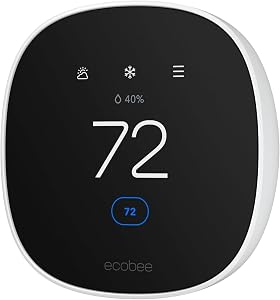
- Display: Color Touchscreen Interface
- Wiring: Power Extender Kit Supported
- System Compatibility: 85% of HVAC Systems
- Ecosystem Support: Home Assistant, HomeKit, Alexa
The ecobee Smart Thermostat Essential brings premium eco-friendly automation at an approachable entry point. Designed to lower heating and cooling bills by up to 23% annually, it learns your daily routines and automatically adjusts temperatures when you depart.
Home Assistant users can integrate ecobee locally using the HomeKit Device integration or via cloud APIs. Automatic over-the-air software updates ensure the unit maintains peak security, and optional power adapter accessories make it easy to install in homes lacking existing C-wires.
Pros:
- Local integration option via HomeKit Controller
- Includes support for Power Extender Kits
- Sleek, modern physical hardware design
Cons:
- Power Extender Kit sold separately
- Lacks built-in smart speaker microphones
How to Choose Thermostat for Home Assistant
Integrating climate control into Home Assistant transforms a basic home heating system into an automated climate ecosystem. Selecting the perfect thermostat requires evaluating physical wiring, communication protocols, local control capabilities, and sensor support. This guide covers every essential factor you need to evaluate before purchasing a new smart thermostat for your setup.
Understanding Connection Protocols
The way a thermostat communicates with Home Assistant dictates its speed, reliability, and security. Choosing between local and cloud protocols is one of the most critical decisions in building a resilient home automation setup.
Local Control vs. Cloud-Dependent Integrations
Local communication ensures that your thermostat receives commands instantly and continues operating even if your internet connection goes down. Cloud-based devices rely on third-party servers, introducing latency and potential failure points if the manufacturer discontinues service.
| Protocol | Communication Mode | Internet Required? | Latency Level |
|---|---|---|---|
| Matter over Wi-Fi/Thread | Local | No | Ultra-Low |
| HomeKit Device (Local) | Local | No | Low |
| Zigbee / Z-Wave | Local | No | Low |
| Standard Wi-Fi Cloud API | Cloud | Yes | Medium to High |
Matter 1.4 and Future-Proofing
Matter is revolutionizing smart home device compatibility. Thermostats featuring Matter support allow native direct control within Home Assistant without custom integration components or custom API tokens. Devices like the Aqara W200 utilize Matter over Wi-Fi to deliver secure local control, making them future-proof additions to your smart home ecosystem.
HVAC Compatibility and Electrical Wiring Requirements
Before purchasing any smart thermostat, you must verify the electrical compatibility of your existing HVAC system. Incorrect wiring can cause operational failures or permanently damage your control board.
Checking for the C-Wire (Common Wire)
The C-wire provides continuous 24V AC power to the thermostat. While traditional non-smart units rely on small batteries, modern connected thermostats require stable power to run Wi-Fi radios, touchscreens, and onboard sensors.
- If you have a C-Wire: All smart thermostats listed in this guide are compatible.
- If you do NOT have a C-Wire: Options like the Sensi ST55 work without a common wire in many systems. Alternatively, use a Power Extender Kit (PEK) with models like the ecobee Essential or Aqara W200.
High-Voltage vs. Low-Voltage Systems
Most standard residential smart thermostats operate on 24V low-voltage systems (furnaces, heat pumps, central air). If your home uses 120V or 240V electric baseboard heaters, standard smart thermostats will not work. Always inspect your existing thermostat wires before buying.
Key Smart Features to Consider
Modern thermostats offer advanced hardware features that simplify home management and enhance your overall smart home experience.
Presence and Occupancy Detection
Basic thermostats rely on static time schedules. Advanced options use built-in sensors to detect human activity automatically:
- mmWave Radar Sensors: Detected in units like the Aqara W200, mmWave radar senses micro-movements (such as breathing), preventing the thermostat from switching to away mode while you are sitting quietly in the room.
- PIR Motion Sensors: Detect larger movements across the room, suitable for high-traffic hallways and main living areas.
- Geofencing: Uses your phone location to set away temperatures when everyone departs the house.
Touchscreens and Smart Interfaces
Consider who will operate the thermostat in your household. If family members or guests prefer physical adjustments, a bright, clear touchscreen with intuitive buttons like those on the Honeywell RTH9600WF or ecobee Essential provides an accessible experience for everyone.
Maximizing Automation with Home Assistant
Once connected to Home Assistant, smart thermostats can interact with hundreds of other smart sensors, doors, windows, and energy meters.
Window and Door Open Detection
One of the most effective energy-saving automations involves pairing door and window contact sensors with your thermostat. You can configure Home Assistant to turn off heating or cooling automatically whenever an exterior window or door remains open for longer than five minutes, preventing wasted energy.
Dynamic Energy Management and Solar Tracking
If your energy provider uses time-of-use pricing, Home Assistant can adjust your target temperatures dynamically. You can pre-cool or pre-heat your home during off-peak hours when electricity is cheapest, or run heating systems aggressively while your rooftop solar panels generate excess energy.
Final Buying Checklist
- Remove your old thermostat faceplate and confirm your wire labels (R, C, W, Y, G).
- Decide whether local control (Matter / HomeKit) or cloud features best match your home network strategy.
- Select a model with an interface that matches your aesthetic preferences and physical operating needs.
- Ensure your chosen device integrates smoothly with your target Home Assistant automation blueprints.